 By Rakesh Joshi
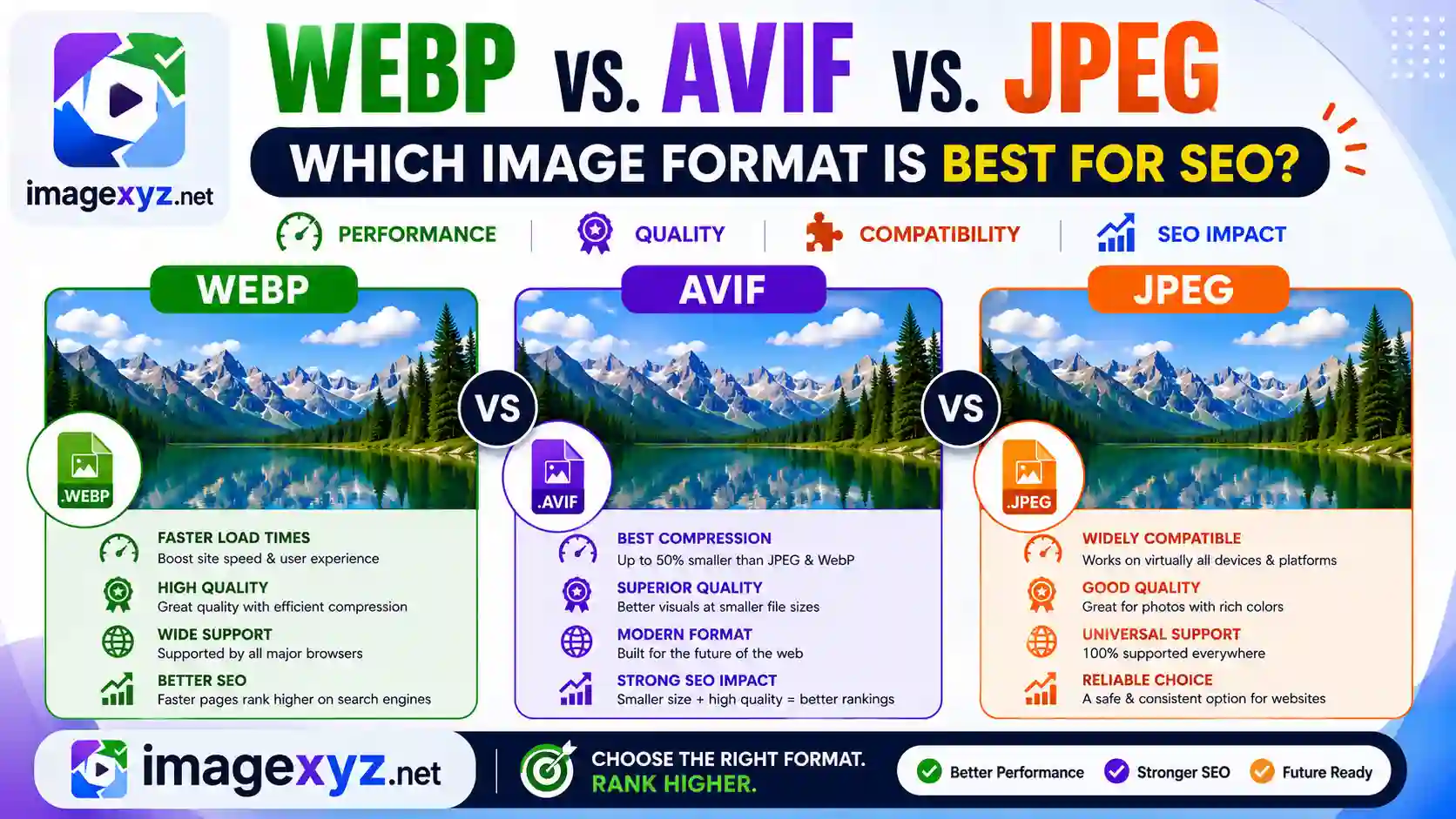
In the high-stakes arena of search engine optimization, page load speed is no longer just a technical detail—it is a critical ranking factor. As Google continues to refine its search algorithms to prioritize user experience, website owners must optimize every byte of their web pages. The most significant drag on page speed is almost always image files. If you are trying to decide how to encode your site's graphic assets, you will inevitably face the question: WebP vs. AVIF vs. JPEG: Which Image Format is Best for SEO? Making the wrong choice can bloat your pages, damage your Core Web Vitals, and drag down your search engine positions. This comprehensive guide compares WebP, AVIF, and JPEG across compression ratios, image quality, browser compatibility, and SEO performance, giving you the definitive blueprint to maximize your rankings.
A major roadblock when trying to optimize graphics is that traditional cloud-based utilities require you to upload your files to remote servers. This transaction consumes bandwidth and risks exposing sensitive metadata. Operating entirely within your browser sandbox, ImageXyz processes your images locally in browser memory without sending a single byte over the internet. Whether you are using our client-side Local Image Converter, converting format extensions using Image to WebP, or converting AVIF using AVIF to JPEG, you can ensure high performance, security, and top-tier SEO optimizations without network transmission.
Boost Core Web Vitals Instantly
Do not let heavy files degrade your mobile rankings. Switch your site assets to modern formats locally and securely. Use our client-side Online Image Converter to format and compress JPEGs, PNGs, and WebPs in seconds with zero uploads.
Understanding the Competitors: What Are JPEG, WebP, and AVIF?
Before diving into search engine metrics, it is vital to understand the design, history, and technical architectures of the three formats. Image file formats are not created equal; they rely on vastly different compression algorithms, color handling structures, and metadata wrappers.
1. JPEG / JPG (Joint Photographic Experts Group)
Established in 1992, JPEG has been the foundation of digital imaging for over three decades. It is a lossy compression format designed specifically for complex, continuous-tone photographs that feature smooth gradients and realistic textures.
JPEG uses a block-based Discrete Cosine Transform (DCT) to discard subtle color details that are difficult for the human eye to perceive. Because of its age, JPEG is compatible with 100% of digital devices and web browsers. However, it lacks support for transparent backgrounds (alpha channels) and animation. Over-compressing JPEGs leads to blocky artifact patterns and color bleeding along high-contrast borders.
2. WebP (Google Web Format)
Introduced by Google in 2010, WebP was developed specifically to make the web faster. It was designed to replace both JPEG and PNG by offering both lossy and lossless compression models inside a single container.
Lossy WebP compression is built on VP8 video keyframe coding technology. It uses predictive coding to look at surrounding blocks of pixels, calculate values, and encode only the differences. Lossless WebP relies on advanced spatial correlation matching.
WebP is extremely versatile: it supports 8-bit alpha channel transparency (like PNG) and frame animation (like GIF) while generating files that are 25% to 35% smaller than JPEGs at equivalent quality. Today, WebP is natively supported by over 99% of web browsers.
3. AVIF (AV1 Image File Format)
Released in 2019 by the Alliance for Open Media (AOMedia), AVIF represents the next generation of digital compression. AVIF is an open-source, royalty-free format that encapsulates AV1 video codec intra-frames inside an HEIF (High Efficiency Image File Format) container.
AVIF utilizes advanced video compression techniques such as variable block-size partitioning, directional intra-prediction, and loop filtering. This allows AVIF to compress files significantly better than WebP and JPEG. AVIF supports high-dynamic-range (HDR) imagery, 10-bit and 12-bit color depths, and wide color gamuts (WCG).
For web optimization, AVIF routinely generates files that are 50% smaller than JPEGs and 20% to 30% smaller than WebPs, making it the absolute champion of lightweight encoding. However, it requires significant CPU cycles to compress and is supported by approximately 93% of browsers.
Core Web Vitals: The Direct Link Between Image Formats and Google Rankings
In mid-2021, Google rolled out the Page Experience Update, elevating Core Web Vitals to direct search engine ranking signals. Core Web Vitals are a set of three performance metrics that measure real-world user experience on mobile and desktop screens. Images play a dominant role in determining these scores:
Largest Contentful Paint (LCP)
Largest Contentful Paint (LCP) measures how long it takes for the largest visual element on a page (typically a hero image, header banner, or featured graphic) to fully render on the screen. To achieve a "Good" rating, LCP must occur within 2.5 seconds.
Because images are often the largest content blocks, their file size determines LCP. If a page uses a 1.5MB JPEG banner, the browser must spend valuable seconds downloading the file over mobile networks. If you convert that image to a 200KB WebP or a 120KB AVIF using local tools, the download completes almost instantly, lowering LCP and improving your ranking potential.
Cumulative Layout Shift (CLS)
Cumulative Layout Shift (CLS) measures the visual stability of a page by tracking unexpected layout jumps during loading. To ensure a good user experience, CLS must remain below 0.1.
This relates directly to how images are integrated. If a browser downloads a heavy JPEG file that has no declared dimensions in the HTML code, the browser cannot allocate layout space for the image beforehand. When the image finally loads, it pushes paragraphs, buttons, and text blocks downward. This layout shift triggers a CLS penalty. Declaring explicit width and height attributes in your HTML forces the browser to reserve space instantly, resolving CLS issues regardless of format.
Interaction to Next Paint (INP)
Interaction to Next Paint (INP) assesses a page's responsiveness to user interactions (like clicks or taps) by measuring the delay before visual feedback is rendered.
Large image files can clog the browser's main thread during network transfers, blocking the parsing of CSS and JavaScript. By serving lightweight WebP and AVIF files, you free up the browser's CPU, allowing it to execute JavaScript and respond to user inputs immediately. This keeps your INP times low and your user experience snappy.
Compression Efficiency Showdown: Benchmarks & Visual Fidelity
To understand why AVIF and WebP outperform JPEG, we must examine real-world compression data. When you convert an image, you are reducing its file size while trying to retain visual quality. Let's compare how the three formats perform across different compression levels:
| Format | Typical Quality Setting | Average File Size (Photographic) | Average File Size (Graphics/Text) | Transparency Support | Browser Support |
|---|---|---|---|---|---|
| JPEG | 80% - 90% | 240 KB (Baseline 100%) | 450 KB (High details) | No | Universal (100%) |
| WebP | 75% - 85% | 150 KB (35% smaller) | 110 KB (75% smaller vs JPEG) | Yes (8-bit alpha) | Universal (99.2%) |
| AVIF | 60% - 70% | 95 KB (60% smaller) | 75 KB (83% smaller vs JPEG) | Yes (8-bit alpha) | Modern (93.5%) |
This data reveals several critical conclusions for search engine optimization:
- Photographic Content: For complex real-world landscapes and portraits, AVIF achieves outstanding results, reducing file sizes by up to 60% compared to traditional JPEGs. WebP also performs well, offering a 35% reduction.
- Graphic Details and High Contrast: In screenshots, line art, and graphics containing text, legacy JPEGs are highly inefficient because they introduce blurry artifacts around sharp edges. WebP and AVIF compress these graphics exceptionally well, reducing sizes by over 70% while maintaining crisp lines.
- Visual Quality: At extremely low file sizes, JPEG degrades rapidly with blocky compression artifacts. WebP maintains smooth surfaces but can blur high-frequency details. AVIF retains structural details much better, utilizing advanced debanding filters to prevent posterization in gradients.
Browser Compatibility and the Fallback Architecture
If AVIF is the clear winner in compression, why don't we use it exclusively for every image online? The answer lies in browser compatibility.
While JPEG is universal, and WebP has near-total support across all systems, AVIF is still not supported by older operating systems and legacy web browsers (such as older iOS versions). Serving an AVIF image directly to an unsupported browser results in a broken layout, which is disastrous for your SEO rankings.
To solve this, developers use a progressive fallback model using the HTML5 <picture> element. This allows us to serve AVIF to compatible browsers, fallback to WebP, and provide a JPEG as the final default option:
Implementation: Modern Picture Syntax
To maximize speed while maintaining universal support, write your HTML markup as follows:
<picture>
<source srcset="banner.avif" type="image/avif">
<source srcset="banner.webp" type="image/webp">
<img src="banner.jpg" alt="Optimized Hero Graphic" loading="lazy" width="800" height="450">
</picture>
This delivers the lightest file possible to modern devices without leaving older browsers behind.
Step-by-Step Optimization Workflow for Peak SEO
To rank at the top of search results, follow this professional checklist to process and publish your images:
Determine the Display Dimensions
Never upload raw camera dimensions (e.g. 5000px width) directly to web containers. Check your theme layout to identify the maximum width the image will display. If your blog content column is 800px wide, resize your image width to exactly 800px (or 1600px for Retina display support) before compressing. This avoids wasting massive amounts of data.
Convert to Modern Formats (WebP/AVIF)
Convert your original master files (PNGs or JPEGs) into WebP or AVIF. To do this locally and securely without risk of third-party exposure, use our Local Image Converter. Simply import your file, select WebP or AVIF, adjust your settings, and save. The entire conversion completes inside your browser memory.
Choose an Optimal Quality Ratio
For WebP, set the quality level between 75% and 82%. For AVIF, a quality setting between 60% and 70% is usually sufficient. These settings provide the ideal balance between low file size and visual clarity. The resulting files are indistinguishable from uncompressed originals but save up to 80% on file size.
Incorporate Descriptive SEO Alt Tags
Rename your file using descriptive, lowercase keywords separated by hyphens (e.g. webp-vs-avif-vs-jpeg-seo-comparison.webp). Write a descriptive alt attribute for the HTML tag that describes the image content naturally, incorporating target keywords without keyword stuffing. This allows Google's crawler to parse and index your graphics accurately.
Comparative Wrap-up: WebP vs. AVIF vs. JPEG: Which is Best for SEO?
To summarize, the answer to the question WebP vs. AVIF vs. JPEG: Which Image Format is Best for SEO? comes down to your optimization capabilities:
- AVIF is the best format for pure performance. If you want the smallest file sizes and highest compression to score a perfect Core Web Vitals rating, AVIF is the absolute winner. However, you must use the
<picture>element to provide fallback options for unsupported browsers. - WebP is the best all-around format for general web use. It provides excellent compression, supports transparency, and is natively supported by over 99% of browsers. If you want to use a single format for all users without writing complex fallback code, WebP is the ideal choice.
- JPEG is a fallback format. It should only be used as a backup option for older browsers that lack support for WebP and AVIF. Hosting JPEGs as your primary web assets will bloat your pages and lower your search engine rankings.